Skip to content

CityFibre - Service Diagnostics API

Introduction

This documentation provides information on the Service Diagnostics API and how to access it.

Please note:

In this document, we use Buyer and Supplier for the Service Provider / CityFibre respectively and Reporter as the person within the Buyers Organisation.

This document describes the messages which can pass between Buyer and Supplier, and the various status changes and updates for diagnostic requests though-out the process.

Design Overview

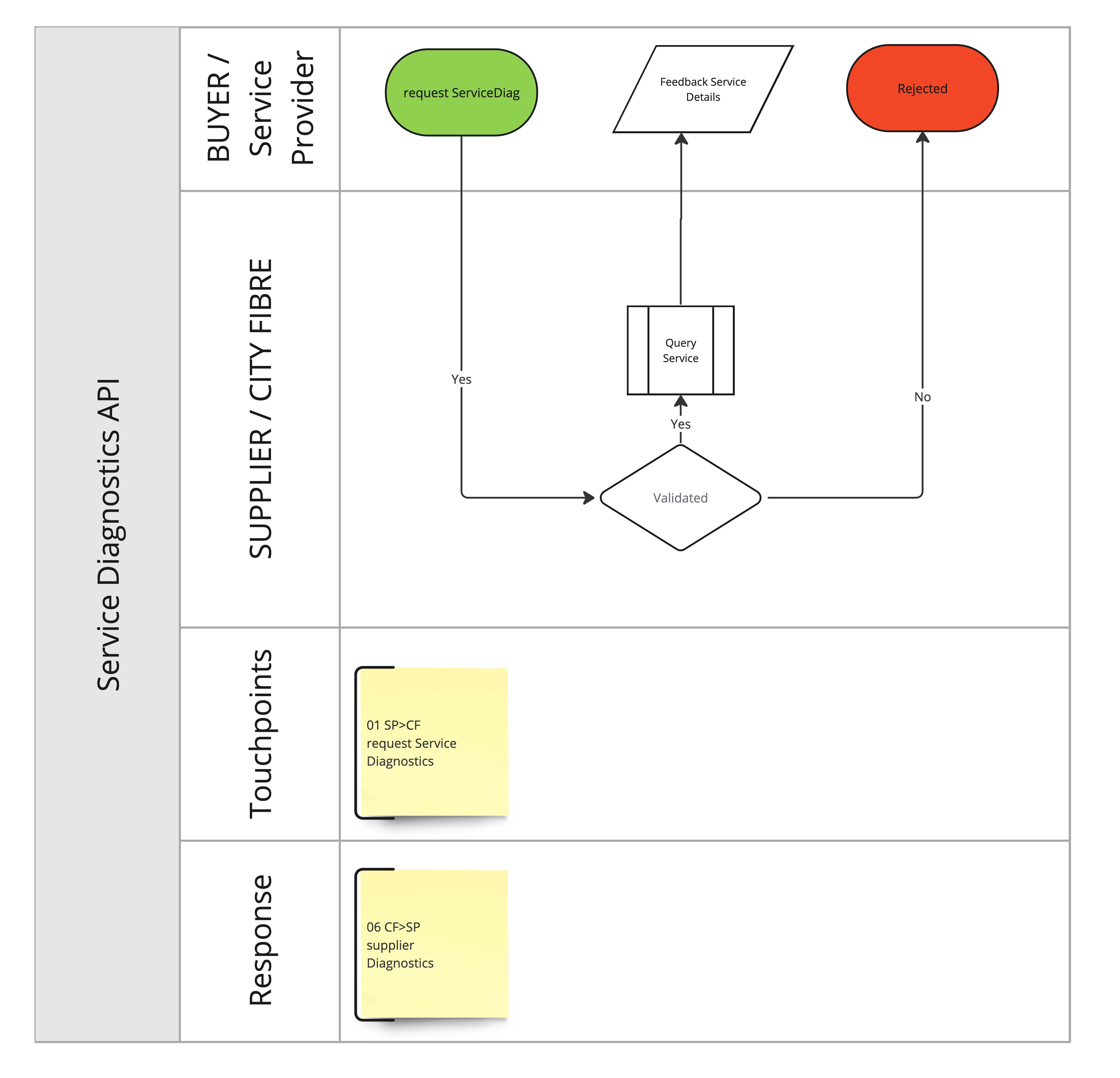
See diagram Diagnostic_API_v1.1 for an overview of the flow.

Diagnostic API v1.1
Diagnostic API v1.1

Accessing the API

The API is accessed via HTTPS. Calls are made by POST, sending XML as the HTTP body.

Messages are exchanged using SOAP exchanges over HTTPS POST, where the request is in the POST body and the response is in the HTTP response body. Messages are encapsulated in a SOAP envelope using Document/Literal style following WS-Basic Profile 1.0.

<soap:Envelope xmlns:soap="http://schemas.xmlsoap.org/soap/envelope/">
    <soap:Body>
         ... single request or response element goes here ...
    </soap:Body>
</soap:Envelope>

Integration Environments

CityFibre provides two pre-production environments for the Buyer to integrate with, to allow the Buyer to test the API endpoint before going live.

Authentication

Authentication is handled in the same way as the Order API and the authentication details provided apply to this API endpoint.

Below are the details for these environments:

Download OpenAPI description
Languages
Servers
Mock server
https://service-diagnostics.docs.cityfibre.com/_mock/openapi
Main (production) server
https://api-gw.cityfibre.com:41223/prod/api2
CFStaging server
https://api-gw.cityfibre.com:41223/cfstaging/api2
CFSit server
https://api-gw.cityfibre.com:41223/cfsit/api2

The Buyer can request diagnostic information for a serviceId reported in the request. The request will come synchronously and contain the serviceDiagnostic information.

The response to a requestServiceDiagnostics call contains the current state of the service and the utilisation status of the network path during the last busy period.

Operations

Request

When the request is received and the ServiceID is validated, the ServiceID is used to Diagnose the network, the found details are then returned to the Supplier in the supplierDiagnostics element of the faultDetails. The details returned are:

ONT Status (Status)

  • Service Up / Service Down
  • Dying Gasp
  • Last Date
  • Time this event was received
  • The change from the previous state

CFM Status (CFM Status)

  • Up/Down CF/Down ISP
  • Last Date
  • Time this event was received
  • The change from the previous state

UniPort Status (Uniport Status)

  • Up/Down
  • Last Date
  • Time this event was received
  • The change from the previous state

Please note – with UniPort Status the Status will continue to show as UP if the ONT Status is DOWN. This is due to the ONT not being able to communicate the UniPort status. In this instance the ONT Status should take priority in the diagnostic analysis. If UniPort Status is blank please use ONT & CFM Status to determine line condition.

In conjunction with the diagnostics process, nodes are classified within distinct lists based on their geographical context:

  • Local Configuration: Identified as ENNI - Interconnect - PON, these nodes signify local network interconnections.
  • National Configuration: Denoted as Interconnect - Handoff - ENNI - PON, these nodes represent national-level network interconnections.

Further, the operational status of these nodes is evaluated and categorized into the following states: Red, Orange, Green, and Unk (for unknown status).

For definition the POP is given a RAG status based upon peak loading over 5 minutes during the Busy Period, currently defined in Schedule 1.

For the PON, the RAG Status is based upon the peak loading over 15 minutes during the Busy Period currently defined in Schedule 1.

For confirmation the RAG status limits are below:

Red – 95% or higher Amber – 80% or more to 94% Green – Less than 79%

Based on the analysis of ONT Status, CFM (Connectivity Fault Management) Status, and Uniport Status, we can now provide a clearer picture of the end-user's service on our network. This enables us to offer the following 9 recommended Next Best Action codes to resolve potential issues effectively:

CodeCurrent StatusResult DescriptionNext Best Action
AOK001Service WorkingONT, Connectivity & Port Status results are all UpWe do not believe there is an issue on our network
CFH001Potential Service Issue DetectedONT is down indicating a potential Fibre issuePlease continue to raise this incident as Total Loss of Service with as much detail as possible including which lights on the ONT are on
CFH002Potential Service Issue DetectedONT is Up, however Connectivity messaging indicates a potential CityFibre issuePlease continue to raise this incident as Total Loss of Service with as much detail as possible including which lights on the ONT are on
CFH003Potential Service Issue Detected at the End User PremisesONT is Up, however Connectivity and Port messaging indicates no connection to the ONT Ethernet PortOur latest checks show that the service may not be working as expected
DYG001CityFibre ONT Powered OffONT messaging is reporting a power supply issueOur latest checks show that the ONT is not connected to a power supply or has been powered off
ISP001Potential Service Issue Detected at the End Users PremisesONT is Up, however Connectivity and Port messaging indicates no connection to the ONT Ethernet PortOur latest checks show that the service may not be working as expected
ISP002Potential Service Issue Detected at the End Users PremisesONT is Up, however Connectivity and Port messaging indicates a connectivity issue with the End-Users RouterOur latest checks show that the service may not be working as expected
ISP003Service WorkingONT, Connectivity Results are all Up. However please check the connection to the ONT Ethernet PortOur latest checks show that the service is working as expected
STF001Unable to Check Network StatusThe Service Test has not been able to runPlease continue to raise an incident
Security
Certificate
Bodyapplication/xml
apiVersionstring(apiVersion)<= 36 charactersrequired

The API version

buyerobject(buyer)required

The Service Provider who consumes the service is the buyer

buyerIdentifierstring<= 36 charactersrequired

Unique identifier of the buyer

Example: "SPDEV1"
messageobject(message)required

The meta-data of the request. It includes information regarding the message UUID, transaction ID and the sent timestamp

messageIdstring<= 36 charactersrequired

A unique ID to identify the message

Example: "b68b2cf4-475e-11e1-a92e-fb2ff6467c99"
sentAtstring(date-time)required

The timestamp when the message has been sent

Example: "2012-01-20T18:30:43Z"
serviceIdstring(serviceId)<= 36 charactersrequired

Unique Identifier for the service

application/xml
<requestServiceDiagnostics xmlns:xsi="http://www.w3.org/2001/XMLSchema-instance"
    xsi:noNamespaceSchemaLocation="../faultReport.xsd">
  <apiVersion>1.0</apiVersion>
  <buyerIdentifier>SPDEV1</buyerIdentifier>
  <sentAt>2018-05-16T12:01:00Z</sentAt>
  <messageId>unique-message-id</messageId>
  <serviceId>S0012345</serviceId>
</requestServiceDiagnostics>

Responses

Service Diagnostics Response

Bodyapplication/xml
One of:

Service Diagnostics can provide you with the result of the request.

apiVersionstring(apiVersion)<= 36 charactersrequired

The API version

buyerobject(buyer)required

The Service Provider who consumes the service is the buyer

buyerIdentifierstring<= 36 charactersrequired

Unique identifier of the buyer

Example: "SPDEV1"
messageobject(message)required

The meta-data of the request. It includes information regarding the message UUID, transaction ID and the sent timestamp

messageIdstring<= 36 charactersrequired

A unique ID to identify the message

Example: "b68b2cf4-475e-11e1-a92e-fb2ff6467c99"
sentAtstring(date-time)required

The timestamp when the message has been sent

Example: "2012-01-20T18:30:43Z"
serviceIdstring(serviceId)<= 36 charactersrequired

Unique Identifier for the service

currentCFMStatusobject(currentCFMStatus)required

Current CFM Status

statusstring(status)<= 36 characters

one of Up, Down, Up CF, Down CF, Up ISP, Down ISP

lastStatusChangeobject(lastStatusChange)
currentUniportStatusobject(currentUniportStatus)

Current Uniport Status

currentStatusobject(currentStatus)required

Current Status

statusstring(status)<= 36 characters

Status of service

lastStatusChangeobject(lastStatusChange)
servicePathUsageArray of objects(servicePathUsage)required

An array of node utilisations

nodeUtilisationobject
nextBestActionobject(nextBestAction)

Next Best Action

Response
application/xml
<serviceDiagnostics xmlns:xsi="http://www.w3.org/2001/XMLSchema-instance"
  xsi:noNamespaceSchemaLocation="../faultReport.xsd">
  <apiVersion>1.0</apiVersion>
  <buyerIdentifier>SPDEV1</buyerIdentifier>
  <sentAt>2018-05-16T12:01:00Z</sentAt>
  <messageId>unique-message-id</messageId>
  <serviceId>S0012345</serviceId>
  <currentCFMStatus>
    <status>Up</status>
    <lastStatusChange>
      <at>2020-03-24T21:44:30</at>
      <from>Down</from>
      <to>Up</to>
    </lastStatusChange>
  </currentCFMStatus>
  <currentUniportStatus>
    <status>Up</status>
    <lastStatusChange>
      <at>2024-03-20T12:09:11</at>
      <from>Down</from>
      <to>Up</to>
    </lastStatusChange>
  </currentUniportStatus>
  <currentStatus>
    <status>up</status>
    <lastStatusChange>
      <at>2018-05-16T12:01:00Z</at>
      <from>down</from>
      <to>up</to>
    </lastStatusChange>
  </currentStatus>
  <servicePathUsage>
    <nodeUtilisation>
      <nodeName>ENNI</nodeName>
      <nodeStatus>green</nodeStatus>
    </nodeUtilisation>
    <nodeUtilisation>
      <nodeName>Interconnect</nodeName>
      <nodeStatus>green</nodeStatus>
    </nodeUtilisation>
    <nodeUtilisation>
      <nodeName>PON</nodeName>
      <nodeStatus>green</nodeStatus>
    </nodeUtilisation>
  </servicePathUsage>
  <nextBestAction>
    <code>AOK001</code>
    <title>Service Working</title>
    <description>Our latest checks show that the service is working as expected. There does not appear to be an issue within the CityFibre network. We do not believe there is an issue for CityFibre to fix. You can still raise an incident if you wish, however there may be a charge if no CityFibre fault is found.</description>
  </nextBestAction>
</serviceDiagnostics>
Operations
Operations